C++ arrays (std::array)
Concepts
Section titled “Concepts”- The advantage of C++ arrays over C arrays
- Copying and initializing arrays
- Indexing C++ arrays
data- Obtaining addresses of array elements
- Data types other than
intfor array elements
Examples
Section titled “Examples”For fragments without main, include <array> and <iostream> and place the code in main.
1. Obtaining the address of the first element
Section titled “1. Obtaining the address of the first element”std::array<int, 2> arr{ 1, 2 };int* p{ arr.data() };*p = 3;std::cout << arr[0] << std::endl;std::cout << arr[1] << std::endl;Execution trace
Answer
arr.data() returns a pointer to the first element, like &arr[0].
Writing through that pointer changes the element.
It prints 3 and 2.
2. The number of elements
Section titled “2. The number of elements”std::array<int, 3> arr{ 4, 7, 9 };std::cout << arr.size() << std::endl;Answer
It prints 3.
arr.size() returns the number of elements, not the number of bytes.
Here that is the size argument in std::array<int, 3>.
3. Initializing C++ arrays (1)
Section titled “3. Initializing C++ arrays (1)”std::array<int, 2> arr{ 1, 2 };std::array<int, 2> other{ 3, 4 };arr = other;Execution trace
Answer
Here, each element is copied from other into arr.
4. Initializing C++ arrays (2)
Section titled “4. Initializing C++ arrays (2)”std::array<int, 2> arr{ 1, 2 };std::array<int, 2> other{ arr };Execution trace
Answer
The same copying occurs here, when other is created.
5. Address of an array
Section titled “5. Address of an array”std::array<int, 2> arr{ 1, 2 };std::array<int, 2>* p{ &arr };*p = { 3, 4 };std::cout << arr[0] << std::endl;std::cout << arr[1] << std::endl;Execution trace
Answer
p will contain the address of the beginning of the entire array.
This address identifies the entire array, including all its elements.
Here, the original elements are overwritten with 3, 4.
6. Dereferencing an array address
Section titled “6. Dereferencing an array address”std::array<int, 2> arr{ 1, 2 };std::array<int, 2>* p{ &arr };std::array<int, 2> arr1{ *p };arr1[0] = 3;arr1[1] = 4;std::cout << arr[0] << std::endl;std::cout << arr[1] << std::endl;Execution trace
Answer
p points to a variable of type std::array<int, 2>, and the expression *p gives a value
of type std::array<int, 2>, so arr1 receives a copy of the entire array.
Since arr1 is a copy, its changes will not affect arr.
7. Indexing elements through an address
Section titled “7. Indexing elements through an address”std::array<int, 2> arr{ 1, 2 };std::array<int, 2>* p{ &arr };(*p)[0] = 3;(*p)[1] = 4;std::cout << arr[0] << std::endl;std::cout << arr[1] << std::endl;Execution trace
Answer
*p accesses the original variable arr.
(*p)[0] and (*p)[1] access its elements, so the assignments change arr.
It prints 3 and 4.
8. Matrices (two-dimensional arrays)
Section titled “8. Matrices (two-dimensional arrays)”std::array<std::array<int, 2>, 3> arr{ std::array{ 1, 2 }, { 3, 4 }, { 5, 6 },};std::array<int, 2> firstRow { arr[0] };std::array<int, 2> lastRow { arr[2] };arr[0][0] = 7;arr[2][1] = 8;arr[1] = { 9, 10 };Execution trace
Answer
This illustrates an array whose element type is another array rather than int.
Each array element therefore effectively stores two ints.
In the initialization of
arr, you need to specifystd::arraybecause otherwise the compiler cannot determine the element type from the initialization. It needs a little help.You do not need to understand this mechanism yet.
Can a user-defined type be used as an array element?
Yes. Try defining a type, for example:
struct Item{ int f1; int f2;};And use it as the element type, like this:
std::array<Item, 3> arr{ Item{ 1, 2 }, { 3, 4 }, { 5, 6 },};Structures and arrays
Section titled “Structures and arrays”1. An array field of addresses
Section titled “1. An array field of addresses”#include <iostream>#include <array>
struct A{ std::array<int*, 2> f;};
int main(){ int var1; int var2; A a { .f = { &var1, &var2 } }; *a.f[0] = 1; *a.f[1] = 2; int** b = a.f.data(); int c = **b;
std::cout << var1 << std::endl; std::cout << var2 << std::endl;
std::cout << a.f[0] << std::endl; std::cout << a.f[1] << std::endl;
std::cout << b << std::endl; std::cout << c << std::endl;}Execution trace
Answer:
The line A a { .f = { &var1, &var2 } }; initializes a,
putting the address of var1 into field a.f[0] and the address of var2 into a.f[1].
In the line *a.f[0] = ..., execution follows the address stored in a.f[0]:
*a.f[0] -> *(a.f[0]) -> *(&var1) -> var1.
In int** b = a.f.data();, .data() returns &(a.f[0]), with type int**.
This gives the address of the first element in array f in a.
It prints:
1,2as the values ofvar1andvar2;- the addresses of
var1andvar2as the values ofa.f[0]anda.f[1]; cis equal to1.
2. Structure size (2)
Section titled “2. Structure size (2)”#include <iostream>#include <array>
struct A{ std::array<int, 4> f1; int* f2;};
int main(){ std::cout << sizeof(A) << std::endl;}Answer:
std::array<int, 4> f1is 4ints, 4 bytes each — 16 bytes;int* f2is 8 bytes on a 64-bit processor.
The total is 24 bytes.
3. Initializing an array field
Section titled “3. Initializing an array field”#include <iostream>#include <array>
struct A{ std::array<int, 2> arr;};
int main(){ A a { { 1, 2 } }; A b { { 3, 4 } }; b = a;
std::cout << b.arr[0] << std::endl; std::cout << b.arr[1] << std::endl;}Execution trace
Answer:
It prints 1, 2.
4. Copying a structure with an array field
Section titled “4. Copying a structure with an array field”#include <iostream>#include <array>
struct A{ std::array<int, 2> arr;};
int main(){ A a { { 1, 2 } }; A b { a };
a.arr[0] = 3;
std::cout << b.arr[0] << std::endl; std::cout << b.arr[1] << std::endl; std::cout << a.arr[0] << std::endl; std::cout << a.arr[1] << std::endl;}Execution trace
Answer:
A b{ a } copies the values of all fields, including the whole array, element by element.
At the moment of copying, a holds arr[0] = 1, arr[1] = 2,
so b receives the same values: b.arr[0] = 1, b.arr[1] = 2.
But it is a separate copy in b’s own memory: the array arr itself
is stored inside A by value, not by address.
So a.arr[0] = 3 affects only a, while b stays untouched.
It prints 1, 2, 3, 2.
5. An array of structures
Section titled “5. An array of structures”#include <iostream>#include <array>
struct A{ int f1; int f2;};
int main(){ std::array<A, 3> arr{};
arr[0].f2 = 1;
arr[1] = A{ 2, 3 };
A copy { arr[2] }; copy.f1 = 4; copy.f2 = 5;
std::cout << arr[0].f1 << std::endl; std::cout << arr[0].f2 << std::endl; std::cout << arr[1].f1 << std::endl; std::cout << arr[1].f2 << std::endl; std::cout << arr[2].f1 << std::endl; std::cout << arr[2].f2 << std::endl;}Execution trace
Answer:
The line std::array<A, 3> arr{};:
- Defines an array of three variables of type
A. In total, memory is allocated for 6ints. - The braces mean “initialize with zeros”.
Each array element is filled with the default
A, namelyA{}, which means all 6ints become zero.
In arr[0].f2 = 1;, arr[0] accesses the memory of
the first variable in the array.
This variable has type A (not int! It is very important to understand this).
Its second field (.f2) is assigned 1 (= 1).
arr[1] = A{ 2, 3 }; overwrites the entire second element
with the result of expression A{ 2, 3 }.
This overwrites both fields.
A copy { arr[2] }; reads the third element of the array,
copying what is there into temporary variable copy.
copy holds a copy of the value from arr[2] of type A (that is, it has a copy of all fields).
Therefore, subsequent changes to copy do not affect arr[2].
0123006. (advanced level): Splitting an array of structures
Section titled “6. (advanced level): Splitting an array of structures”#include <array>#include <cstddef>#include <cstdint>#include <iostream>
const size_t count = 2;
struct Monitor{ double diagonalInches;};
struct Keyboard{ uint8_t rows; uint8_t columns;};
struct Computer{ Monitor monitor; Keyboard keyboard;};
struct Computers{ std::array<Monitor, count> monitors; std::array<Keyboard, count> keyboards;};
struct ComputerRef{ Monitor* monitor; Keyboard* keyboard;};
ComputerRef getComputer(Computers* computers, size_t index){ return ComputerRef{ &computers->monitors[index], &computers->keyboards[index], };}
int main(){ { std::array<Computer, count> computers{}; computers[0].monitor.diagonalInches = 27; computers[0].keyboard.rows = 6; std::cout << sizeof(computers) << std::endl; }
{ Computers computers{}; ComputerRef computer = getComputer(&computers, 0); computer.monitor->diagonalInches = 27; computer.keyboard->rows = 6; std::cout << sizeof(computers) << std::endl; }}Answer
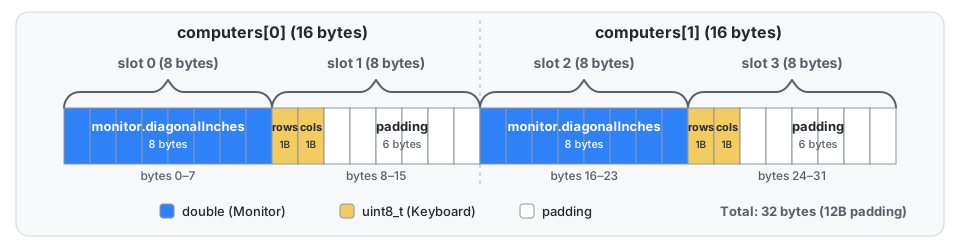
The first block prints 32, which is 2 * 16: every Computer takes 16 bytes,
although its parts take only 8 + 2 = 10.
A double must be aligned to 8, and the size of the structure must be a multiple of 8,
otherwise the next element of the array would start at a misaligned address.
So 6 empty bytes stay at the end of every computer.
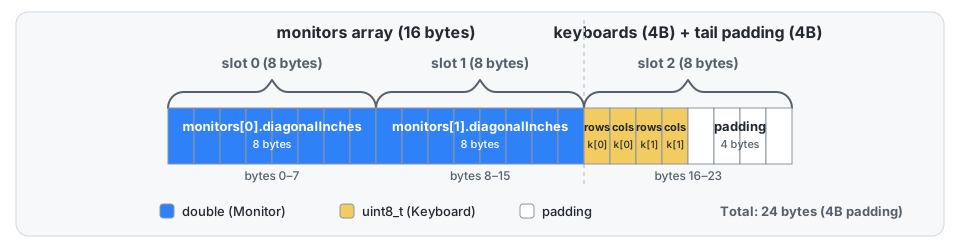
The second block stores the parts in separate arrays and prints 24.
The arrays themselves take 16 + 4 = 20 bytes, but Computers is also a structure,
and its size must be a multiple of the 8-byte alignment of Monitor,
so 4 more empty bytes stay at its end. The padding between computers is gone,
and the saving grows with the number of elements:
a thousand computers take 10000 bytes instead of 16000.
Both blocks write the same values into the first computer.
getComputer returns a ComputerRef with pointers to the parts at the same index,
so computer.monitor and computer.keyboard access the parts of one computer,
as if they were still stored together.